> ## Documentation Index
> Fetch the complete documentation index at: https://docs-dev-feat-docs-5417-afc.mintlify.site/llms.txt
> Use this file to discover all available pages before exploring further.

> Learn how to configure an update policy form using Forms for Actions for users to review and accept new terms of service or consent updates.

# Use Cases: Configure an update policy form using Forms

<Card title="Before you start">
  1. Create a [Machine-to-Machine Application](/docs/get-started/auth0-overview/create-applications/machine-to-machine-apps) with the following scopes enabled:

  * `read:users`
  * `update:users`
  * `create:users`
  * `read:users_app_metadata`
  * `update:users_app_metadata`
  * `create:users_app_metadata`

  2. Add a [Vault connection](/docs/customize/forms/vault) using the M2M application credentials.
</Card>

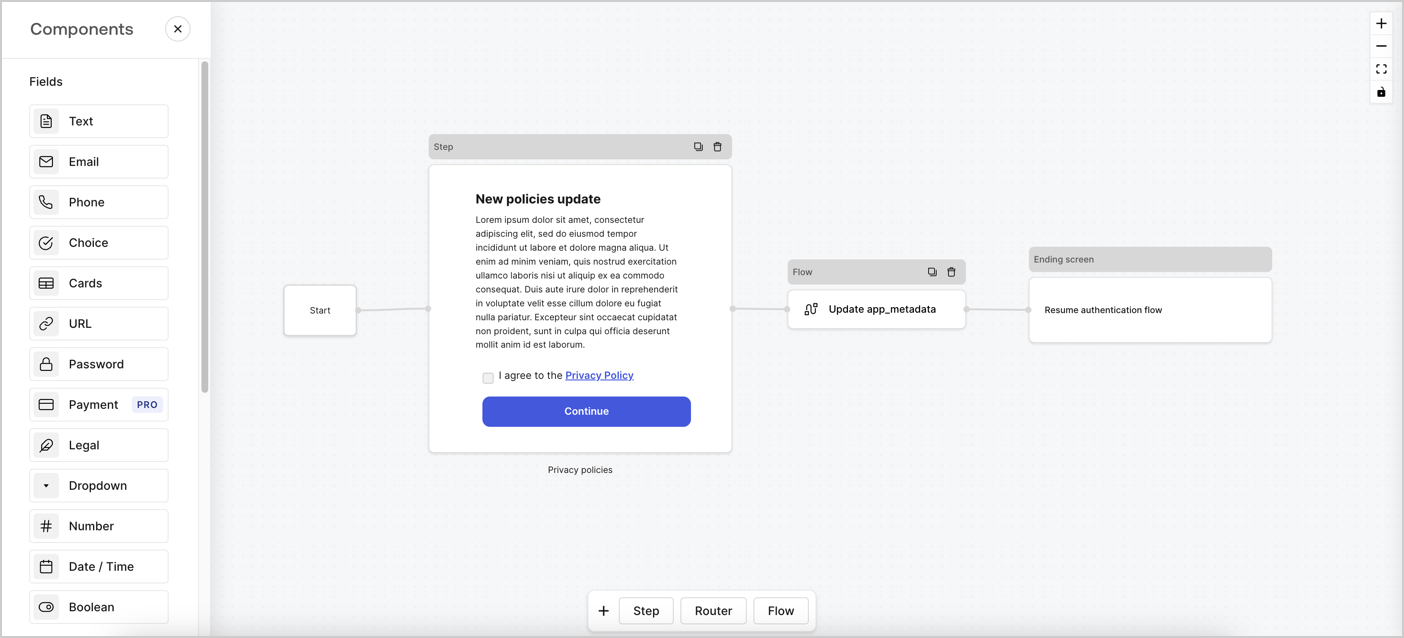
Forms for Actions allows you to create custom privacy policies flows and store the consent under the `app_metadata` object.
<Frame>
  <img src="https://mintcdn.com/docs-dev-feat-docs-5417-afc/P2qTat392TIRu_Rb/docs/images/cdy7uua7fh8z/6i68dMvHDTijfRmSgN1x8Q/ad900e7d4c0fb34645921435472b8684/privavy-policy-form.png?fit=max&auto=format&n=P2qTat392TIRu_Rb&q=85&s=f9cfa3ec92dcaa40ec0266b8e4afb365" alt="Dashboard > Actions > Forms > Privacy policy use case" data-og-width="1404" width="1404" data-og-height="638" height="638" data-path="docs/images/cdy7uua7fh8z/6i68dMvHDTijfRmSgN1x8Q/ad900e7d4c0fb34645921435472b8684/privavy-policy-form.png" data-optimize="true" data-opv="3" srcset="https://mintcdn.com/docs-dev-feat-docs-5417-afc/P2qTat392TIRu_Rb/docs/images/cdy7uua7fh8z/6i68dMvHDTijfRmSgN1x8Q/ad900e7d4c0fb34645921435472b8684/privavy-policy-form.png?w=280&fit=max&auto=format&n=P2qTat392TIRu_Rb&q=85&s=304a9d8b0f0ea8c079393f543a7dcab4 280w, https://mintcdn.com/docs-dev-feat-docs-5417-afc/P2qTat392TIRu_Rb/docs/images/cdy7uua7fh8z/6i68dMvHDTijfRmSgN1x8Q/ad900e7d4c0fb34645921435472b8684/privavy-policy-form.png?w=560&fit=max&auto=format&n=P2qTat392TIRu_Rb&q=85&s=77ed0dec323f3a3b8b0688a503cefeb7 560w, https://mintcdn.com/docs-dev-feat-docs-5417-afc/P2qTat392TIRu_Rb/docs/images/cdy7uua7fh8z/6i68dMvHDTijfRmSgN1x8Q/ad900e7d4c0fb34645921435472b8684/privavy-policy-form.png?w=840&fit=max&auto=format&n=P2qTat392TIRu_Rb&q=85&s=789a44d2dedd49cb00841ab831b0f360 840w, https://mintcdn.com/docs-dev-feat-docs-5417-afc/P2qTat392TIRu_Rb/docs/images/cdy7uua7fh8z/6i68dMvHDTijfRmSgN1x8Q/ad900e7d4c0fb34645921435472b8684/privavy-policy-form.png?w=1100&fit=max&auto=format&n=P2qTat392TIRu_Rb&q=85&s=9bddf419dea7601a5880fd2b8262dd57 1100w, https://mintcdn.com/docs-dev-feat-docs-5417-afc/P2qTat392TIRu_Rb/docs/images/cdy7uua7fh8z/6i68dMvHDTijfRmSgN1x8Q/ad900e7d4c0fb34645921435472b8684/privavy-policy-form.png?w=1650&fit=max&auto=format&n=P2qTat392TIRu_Rb&q=85&s=b142bb3dbb932069de94847bd9613f74 1650w, https://mintcdn.com/docs-dev-feat-docs-5417-afc/P2qTat392TIRu_Rb/docs/images/cdy7uua7fh8z/6i68dMvHDTijfRmSgN1x8Q/ad900e7d4c0fb34645921435472b8684/privavy-policy-form.png?w=2500&fit=max&auto=format&n=P2qTat392TIRu_Rb&q=85&s=d5ca28b57a0da6bda9fa670b4a90b0e1 2500w" />
</Frame>

The sections below outline how you can create an Update Policy form using nodes and flows, along with steps for adding your form to a [Post Login](/docs/customize/actions/explore-triggers/signup-and-login-triggers/login-trigger) Action.

## Create a form from scratch

Follow these steps to create a form to gather information:

1. Open the Form editor by selecting **Auth0 Dashboard > Actions > Forms.**
2. Select **Create Form** > **Start from scratch**.

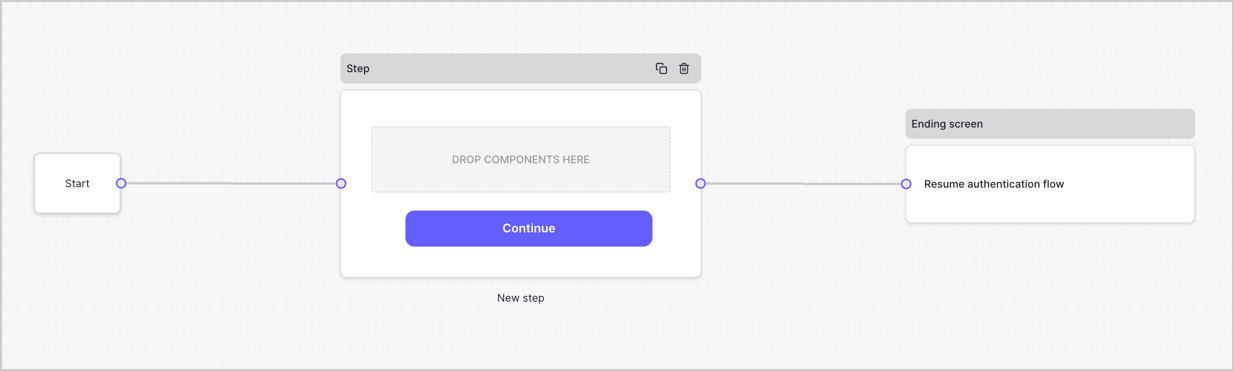
By default, a new form contains a Start node, a Step node, and an Ending screen node.
<Frame>
  <img src="https://mintcdn.com/docs-dev-feat-docs-5417-afc/9ERACT33BIPeePK1/docs/images/cdy7uua7fh8z/2TZ9jSjgEcARFpULI6hz4R/a4319a1bd482f2ee5cc23100fdb2f42c/New-form-Forms-for-action-use-case.png?fit=max&auto=format&n=9ERACT33BIPeePK1&q=85&s=b48483b6173ab589b60022f871819cd6" alt="Dashboard > Forms > Use Cases > Form" data-og-width="1234" width="1234" data-og-height="371" height="371" data-path="docs/images/cdy7uua7fh8z/2TZ9jSjgEcARFpULI6hz4R/a4319a1bd482f2ee5cc23100fdb2f42c/New-form-Forms-for-action-use-case.png" data-optimize="true" data-opv="3" srcset="https://mintcdn.com/docs-dev-feat-docs-5417-afc/9ERACT33BIPeePK1/docs/images/cdy7uua7fh8z/2TZ9jSjgEcARFpULI6hz4R/a4319a1bd482f2ee5cc23100fdb2f42c/New-form-Forms-for-action-use-case.png?w=280&fit=max&auto=format&n=9ERACT33BIPeePK1&q=85&s=9f3ea25e5f419fafd153b68fc3302cb8 280w, https://mintcdn.com/docs-dev-feat-docs-5417-afc/9ERACT33BIPeePK1/docs/images/cdy7uua7fh8z/2TZ9jSjgEcARFpULI6hz4R/a4319a1bd482f2ee5cc23100fdb2f42c/New-form-Forms-for-action-use-case.png?w=560&fit=max&auto=format&n=9ERACT33BIPeePK1&q=85&s=a9b870431fa888a6676fd6f473454af4 560w, https://mintcdn.com/docs-dev-feat-docs-5417-afc/9ERACT33BIPeePK1/docs/images/cdy7uua7fh8z/2TZ9jSjgEcARFpULI6hz4R/a4319a1bd482f2ee5cc23100fdb2f42c/New-form-Forms-for-action-use-case.png?w=840&fit=max&auto=format&n=9ERACT33BIPeePK1&q=85&s=a34924da78354766a9f1769f5daba6e8 840w, https://mintcdn.com/docs-dev-feat-docs-5417-afc/9ERACT33BIPeePK1/docs/images/cdy7uua7fh8z/2TZ9jSjgEcARFpULI6hz4R/a4319a1bd482f2ee5cc23100fdb2f42c/New-form-Forms-for-action-use-case.png?w=1100&fit=max&auto=format&n=9ERACT33BIPeePK1&q=85&s=40342ef3d43090bbd2bbc8ed97042fe5 1100w, https://mintcdn.com/docs-dev-feat-docs-5417-afc/9ERACT33BIPeePK1/docs/images/cdy7uua7fh8z/2TZ9jSjgEcARFpULI6hz4R/a4319a1bd482f2ee5cc23100fdb2f42c/New-form-Forms-for-action-use-case.png?w=1650&fit=max&auto=format&n=9ERACT33BIPeePK1&q=85&s=2b467e4171546f68147eac76d778def7 1650w, https://mintcdn.com/docs-dev-feat-docs-5417-afc/9ERACT33BIPeePK1/docs/images/cdy7uua7fh8z/2TZ9jSjgEcARFpULI6hz4R/a4319a1bd482f2ee5cc23100fdb2f42c/New-form-Forms-for-action-use-case.png?w=2500&fit=max&auto=format&n=9ERACT33BIPeePK1&q=85&s=5c2b42ff4f88578e6d87286aa7f47d4d 2500w" />
</Frame>

### Configure the Step node

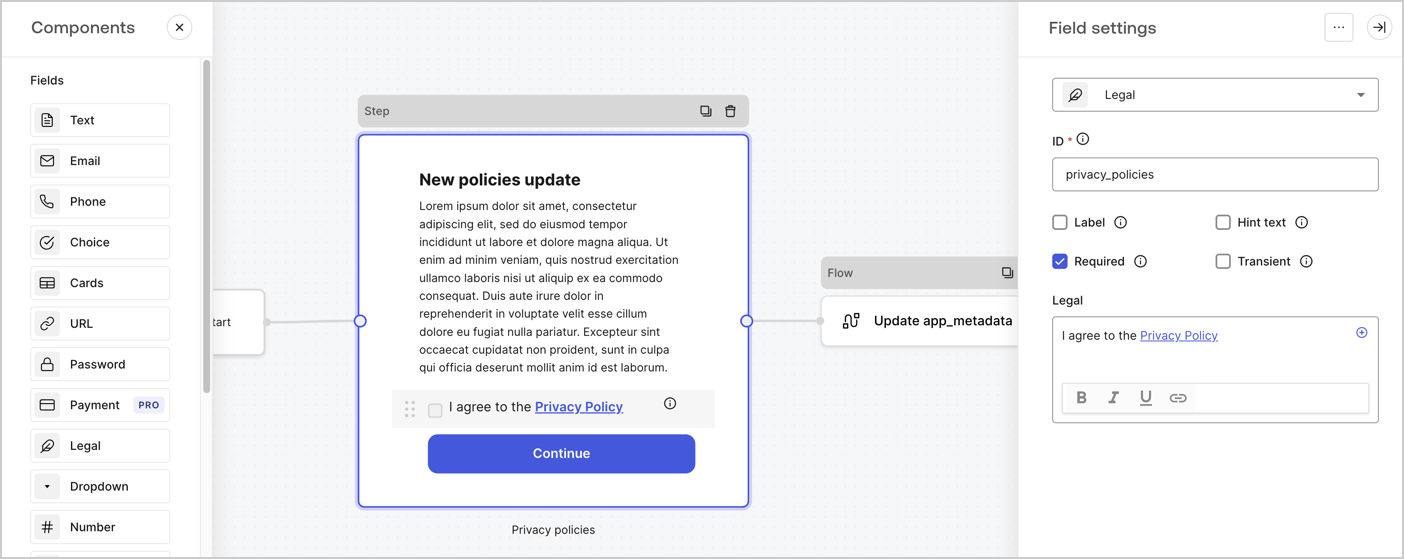
The Step node is the graphical interface visible to users. Add [Fields](/docs/customize/forms/nodes-and-components) to the Step node to collect the new agreement acceptance value by following these steps:

1. Drag a **Rich text** field from the **Components menu** into the **Step** node.

   * **Rich text**: Enter a description of your privacy policies updates.
   * Select **Save**.
2. Drag a **Legal** field into the **Step** node.

   * **ID**: Enter `privacy_policies`.
   * **Required**: Enable the checkbox.
   * **Legal**: Enter `I agree to the Privacy Policy`.
   * Select **Save**.
3. Select **Publish** to save.
<Frame>
  <img src="https://mintcdn.com/docs-dev-feat-docs-5417-afc/gEJaTQUPlINI0nSe/docs/images/cdy7uua7fh8z/59zFFjQjAnjogkc2QGIqqJ/0ad66b1b636544122aa4e65968b76c2c/privacy-policy-step-node.png?fit=max&auto=format&n=gEJaTQUPlINI0nSe&q=85&s=757b4b924f0c466bfbe36765b9a39af9" alt="Dashboard > Actions > Forms > Use case privacy policy step node" data-og-width="1404" width="1404" data-og-height="559" height="559" data-path="docs/images/cdy7uua7fh8z/59zFFjQjAnjogkc2QGIqqJ/0ad66b1b636544122aa4e65968b76c2c/privacy-policy-step-node.png" data-optimize="true" data-opv="3" srcset="https://mintcdn.com/docs-dev-feat-docs-5417-afc/gEJaTQUPlINI0nSe/docs/images/cdy7uua7fh8z/59zFFjQjAnjogkc2QGIqqJ/0ad66b1b636544122aa4e65968b76c2c/privacy-policy-step-node.png?w=280&fit=max&auto=format&n=gEJaTQUPlINI0nSe&q=85&s=bca0cf820cc23fe330df9c15264e32dc 280w, https://mintcdn.com/docs-dev-feat-docs-5417-afc/gEJaTQUPlINI0nSe/docs/images/cdy7uua7fh8z/59zFFjQjAnjogkc2QGIqqJ/0ad66b1b636544122aa4e65968b76c2c/privacy-policy-step-node.png?w=560&fit=max&auto=format&n=gEJaTQUPlINI0nSe&q=85&s=f7345b6da966c830157e81ea40f575a0 560w, https://mintcdn.com/docs-dev-feat-docs-5417-afc/gEJaTQUPlINI0nSe/docs/images/cdy7uua7fh8z/59zFFjQjAnjogkc2QGIqqJ/0ad66b1b636544122aa4e65968b76c2c/privacy-policy-step-node.png?w=840&fit=max&auto=format&n=gEJaTQUPlINI0nSe&q=85&s=def1406f3d829df4a92141963c934a91 840w, https://mintcdn.com/docs-dev-feat-docs-5417-afc/gEJaTQUPlINI0nSe/docs/images/cdy7uua7fh8z/59zFFjQjAnjogkc2QGIqqJ/0ad66b1b636544122aa4e65968b76c2c/privacy-policy-step-node.png?w=1100&fit=max&auto=format&n=gEJaTQUPlINI0nSe&q=85&s=6f0857ce4d17a84bf8680cdd6cfddb74 1100w, https://mintcdn.com/docs-dev-feat-docs-5417-afc/gEJaTQUPlINI0nSe/docs/images/cdy7uua7fh8z/59zFFjQjAnjogkc2QGIqqJ/0ad66b1b636544122aa4e65968b76c2c/privacy-policy-step-node.png?w=1650&fit=max&auto=format&n=gEJaTQUPlINI0nSe&q=85&s=8d6f9c27e7cac70b4ca0db2c37d0995c 1650w, https://mintcdn.com/docs-dev-feat-docs-5417-afc/gEJaTQUPlINI0nSe/docs/images/cdy7uua7fh8z/59zFFjQjAnjogkc2QGIqqJ/0ad66b1b636544122aa4e65968b76c2c/privacy-policy-step-node.png?w=2500&fit=max&auto=format&n=gEJaTQUPlINI0nSe&q=85&s=665a52b8fbc9e772682f970d6049ecd2 2500w" />
</Frame>

### Configure the Flow node

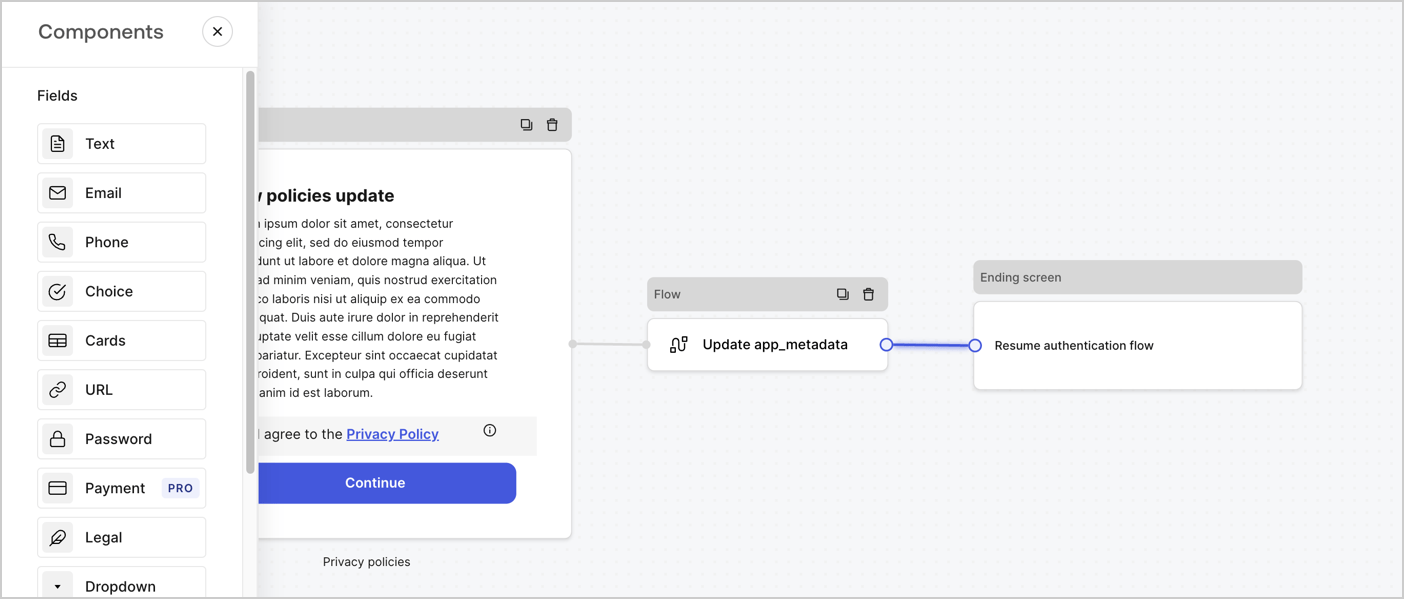
Add a **Flow** node after the **Step** node to update the `app_metadata` and resume the authentication flow by following these steps:

1. Select **Flow** from the bottom of the Form editor.
2. Remove the existing link between the **Step** and **Ending Screen** nodes.
3. Select the new **Flow** > **Click to add a flow** > **Create a new flow.**

   * Enter `Update app_metadata` in the **Name** field.
   * Select **Create**.
   * Select **Save**.
4. Link the **Flow** node to the **Step** and **Ending Screen** nodes as pictured below.
5. Select **Publish** to save.
<Frame>
  <img src="https://mintcdn.com/docs-dev-feat-docs-5417-afc/P2qTat392TIRu_Rb/docs/images/cdy7uua7fh8z/6YIkzm7SrpM9LW76AXuRzh/353c518fe82bbaa440836da1d83596d6/link-policies.png?fit=max&auto=format&n=P2qTat392TIRu_Rb&q=85&s=1500df8a738712f6b31e5b09029c779a" alt="Dashboard > Actions > Forms > Form" data-og-width="1404" width="1404" data-og-height="599" height="599" data-path="docs/images/cdy7uua7fh8z/6YIkzm7SrpM9LW76AXuRzh/353c518fe82bbaa440836da1d83596d6/link-policies.png" data-optimize="true" data-opv="3" srcset="https://mintcdn.com/docs-dev-feat-docs-5417-afc/P2qTat392TIRu_Rb/docs/images/cdy7uua7fh8z/6YIkzm7SrpM9LW76AXuRzh/353c518fe82bbaa440836da1d83596d6/link-policies.png?w=280&fit=max&auto=format&n=P2qTat392TIRu_Rb&q=85&s=388d8c07a3fd3776d7d0f92a90e814af 280w, https://mintcdn.com/docs-dev-feat-docs-5417-afc/P2qTat392TIRu_Rb/docs/images/cdy7uua7fh8z/6YIkzm7SrpM9LW76AXuRzh/353c518fe82bbaa440836da1d83596d6/link-policies.png?w=560&fit=max&auto=format&n=P2qTat392TIRu_Rb&q=85&s=7f916099ed90eb874c65af39936c585c 560w, https://mintcdn.com/docs-dev-feat-docs-5417-afc/P2qTat392TIRu_Rb/docs/images/cdy7uua7fh8z/6YIkzm7SrpM9LW76AXuRzh/353c518fe82bbaa440836da1d83596d6/link-policies.png?w=840&fit=max&auto=format&n=P2qTat392TIRu_Rb&q=85&s=c156fd580edb61aba58e3a494254f523 840w, https://mintcdn.com/docs-dev-feat-docs-5417-afc/P2qTat392TIRu_Rb/docs/images/cdy7uua7fh8z/6YIkzm7SrpM9LW76AXuRzh/353c518fe82bbaa440836da1d83596d6/link-policies.png?w=1100&fit=max&auto=format&n=P2qTat392TIRu_Rb&q=85&s=a08ca4542eb503964b8cf2e3087fda86 1100w, https://mintcdn.com/docs-dev-feat-docs-5417-afc/P2qTat392TIRu_Rb/docs/images/cdy7uua7fh8z/6YIkzm7SrpM9LW76AXuRzh/353c518fe82bbaa440836da1d83596d6/link-policies.png?w=1650&fit=max&auto=format&n=P2qTat392TIRu_Rb&q=85&s=041fe38dcf84690872dbee6efcb89d23 1650w, https://mintcdn.com/docs-dev-feat-docs-5417-afc/P2qTat392TIRu_Rb/docs/images/cdy7uua7fh8z/6YIkzm7SrpM9LW76AXuRzh/353c518fe82bbaa440836da1d83596d6/link-policies.png?w=2500&fit=max&auto=format&n=P2qTat392TIRu_Rb&q=85&s=926e32a1a97d9fcd6b0987fc46f3d3be 2500w" />
</Frame>

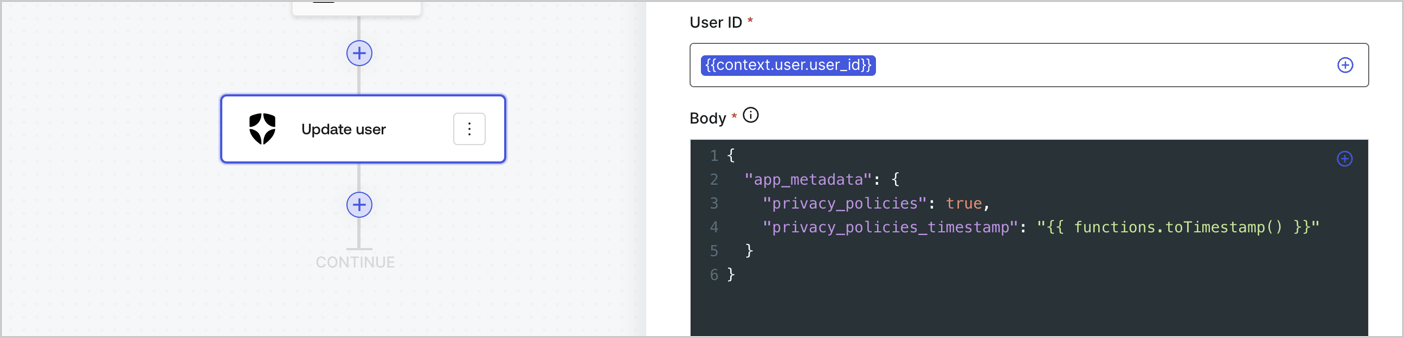
Add an Auth0 Update user action to the flow by following these steps:

1. Select the **Flow** **Update app\_metadata** > **Edit flow** to open the Flow editor in a new tab.
2. Below the StartAction, select the **+** icon to add an **Update user** action. Complete the fields below, then select **Save** to continue.

   * **Connection**: Select from the dropdown the Vault connection to your M2M application.

   * **User ID**: Enter `{{context.user.user_id}}`.

   * **Body**: Copy and paste the following code to update the app\_metadata with the privacy\_policies and privacy\_policies\_timestamp properties.

     ```text lines theme={null}
     {
       "app_metadata": {
         "privacy_policies": true,
         "privacy_policies_timestamp": "{{ functions.toTimestamp() }}"
       }
     }
     ```

   * Select **Save**.
3. Select **Publish** to save.
<Frame>
  <img src="https://mintcdn.com/docs-dev-feat-docs-5417-afc/XfOM8lpzflnuETj3/docs/images/cdy7uua7fh8z/CvMNIwWrOUwaFW4X3G28p/1fb70ae57a20749d9ffaaba8dc0b7e26/update-user-privacy.png?fit=max&auto=format&n=XfOM8lpzflnuETj3&q=85&s=fd683dc7d21edad35139a827ea48ad7d" alt="Dashboard > Actions > Forms > User case privacy policy code" data-og-width="1404" width="1404" data-og-height="338" height="338" data-path="docs/images/cdy7uua7fh8z/CvMNIwWrOUwaFW4X3G28p/1fb70ae57a20749d9ffaaba8dc0b7e26/update-user-privacy.png" data-optimize="true" data-opv="3" srcset="https://mintcdn.com/docs-dev-feat-docs-5417-afc/XfOM8lpzflnuETj3/docs/images/cdy7uua7fh8z/CvMNIwWrOUwaFW4X3G28p/1fb70ae57a20749d9ffaaba8dc0b7e26/update-user-privacy.png?w=280&fit=max&auto=format&n=XfOM8lpzflnuETj3&q=85&s=1a4f803ab0eb7fc8e462dfb10c52a07c 280w, https://mintcdn.com/docs-dev-feat-docs-5417-afc/XfOM8lpzflnuETj3/docs/images/cdy7uua7fh8z/CvMNIwWrOUwaFW4X3G28p/1fb70ae57a20749d9ffaaba8dc0b7e26/update-user-privacy.png?w=560&fit=max&auto=format&n=XfOM8lpzflnuETj3&q=85&s=118246eeda36055514798b9156060bf9 560w, https://mintcdn.com/docs-dev-feat-docs-5417-afc/XfOM8lpzflnuETj3/docs/images/cdy7uua7fh8z/CvMNIwWrOUwaFW4X3G28p/1fb70ae57a20749d9ffaaba8dc0b7e26/update-user-privacy.png?w=840&fit=max&auto=format&n=XfOM8lpzflnuETj3&q=85&s=4a7cf17555cef39b6c81671c64d866f5 840w, https://mintcdn.com/docs-dev-feat-docs-5417-afc/XfOM8lpzflnuETj3/docs/images/cdy7uua7fh8z/CvMNIwWrOUwaFW4X3G28p/1fb70ae57a20749d9ffaaba8dc0b7e26/update-user-privacy.png?w=1100&fit=max&auto=format&n=XfOM8lpzflnuETj3&q=85&s=ffb9e6310b1daa2b10353ec31b75937a 1100w, https://mintcdn.com/docs-dev-feat-docs-5417-afc/XfOM8lpzflnuETj3/docs/images/cdy7uua7fh8z/CvMNIwWrOUwaFW4X3G28p/1fb70ae57a20749d9ffaaba8dc0b7e26/update-user-privacy.png?w=1650&fit=max&auto=format&n=XfOM8lpzflnuETj3&q=85&s=c05b8aff24734162ac06ea33a97b7a01 1650w, https://mintcdn.com/docs-dev-feat-docs-5417-afc/XfOM8lpzflnuETj3/docs/images/cdy7uua7fh8z/CvMNIwWrOUwaFW4X3G28p/1fb70ae57a20749d9ffaaba8dc0b7e26/update-user-privacy.png?w=2500&fit=max&auto=format&n=XfOM8lpzflnuETj3&q=85&s=2f313358e1499117f2e55749eb1a7f2b 2500w" />
</Frame>

<Callout icon="file-lines" color="#0EA5E9" iconType="regular">
  The flow **Update app\_metadata** adds a `privacy_policies true` value to the app`_metadata` object and also generates a timestamp with a [helper function.](/docs/customize/forms/variables)
</Callout>

## Retrieve the form render code

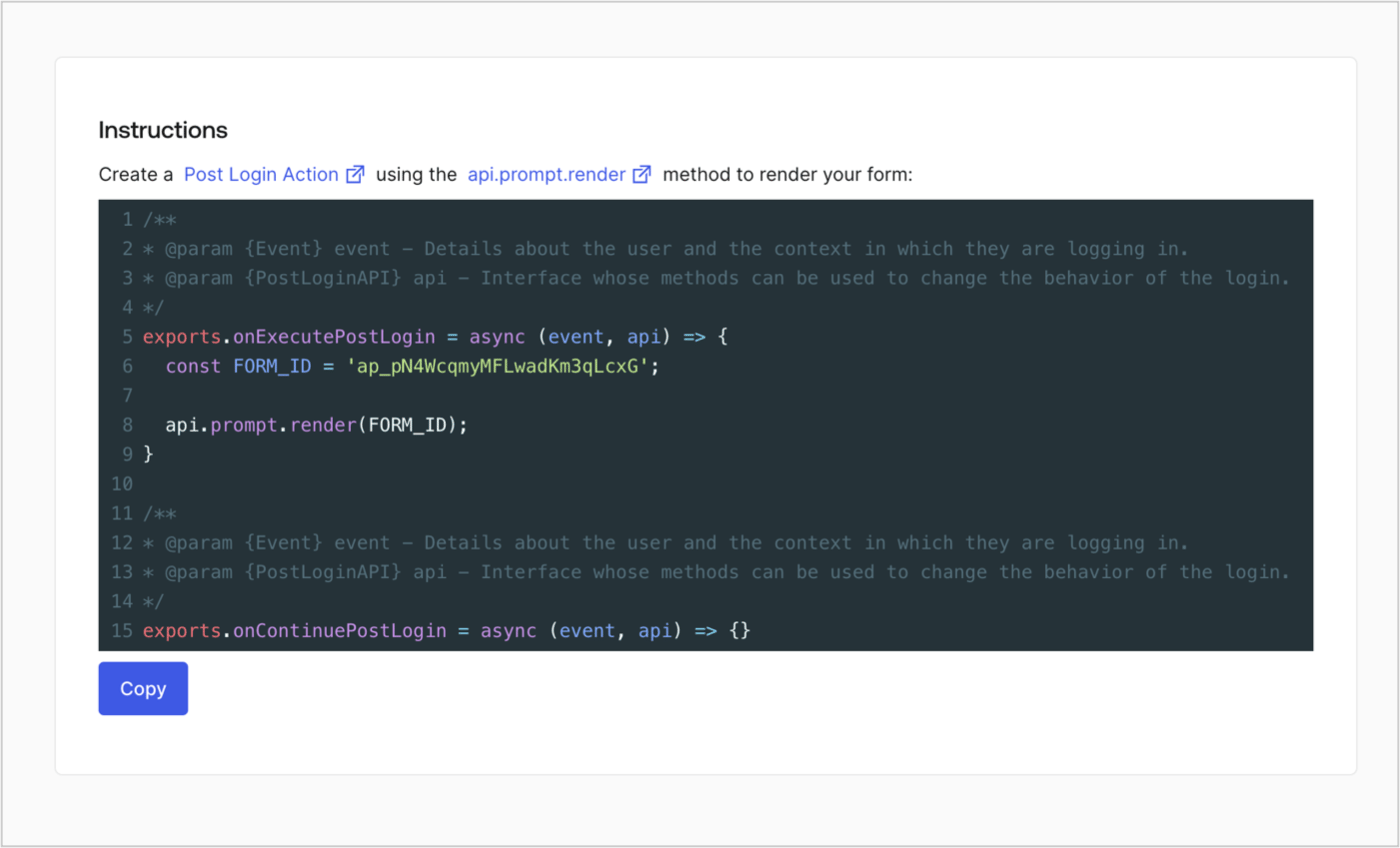
Retrieve your form render code to visually render the form with a custom Post Login Action by following these steps:

* From the Form editor, select **`<> Render`**.
* Select **Copy**.
<Frame>
  <img src="https://mintcdn.com/docs-dev-feat-docs-5417-afc/jXevmccgbQuagT8B/docs/images/cdy7uua7fh8z/2EIUzc539sq9lwoTKbjoJv/496a864c0fc44a782c9cadca119dbfb0/embed.png?fit=max&auto=format&n=jXevmccgbQuagT8B&q=85&s=f5d405116b3391c96c7306ac59c7695c" alt="Dashboard > Actions > Forms > Form > Embed" data-og-width="1400" width="1400" data-og-height="848" height="848" data-path="docs/images/cdy7uua7fh8z/2EIUzc539sq9lwoTKbjoJv/496a864c0fc44a782c9cadca119dbfb0/embed.png" data-optimize="true" data-opv="3" srcset="https://mintcdn.com/docs-dev-feat-docs-5417-afc/jXevmccgbQuagT8B/docs/images/cdy7uua7fh8z/2EIUzc539sq9lwoTKbjoJv/496a864c0fc44a782c9cadca119dbfb0/embed.png?w=280&fit=max&auto=format&n=jXevmccgbQuagT8B&q=85&s=9009ecd5e40c0c8f930d5bfc7c493661 280w, https://mintcdn.com/docs-dev-feat-docs-5417-afc/jXevmccgbQuagT8B/docs/images/cdy7uua7fh8z/2EIUzc539sq9lwoTKbjoJv/496a864c0fc44a782c9cadca119dbfb0/embed.png?w=560&fit=max&auto=format&n=jXevmccgbQuagT8B&q=85&s=98537079e4b1d1375c39aa5ea901ba9d 560w, https://mintcdn.com/docs-dev-feat-docs-5417-afc/jXevmccgbQuagT8B/docs/images/cdy7uua7fh8z/2EIUzc539sq9lwoTKbjoJv/496a864c0fc44a782c9cadca119dbfb0/embed.png?w=840&fit=max&auto=format&n=jXevmccgbQuagT8B&q=85&s=ba8472be52897880d560031bfcd54089 840w, https://mintcdn.com/docs-dev-feat-docs-5417-afc/jXevmccgbQuagT8B/docs/images/cdy7uua7fh8z/2EIUzc539sq9lwoTKbjoJv/496a864c0fc44a782c9cadca119dbfb0/embed.png?w=1100&fit=max&auto=format&n=jXevmccgbQuagT8B&q=85&s=21780d7a45e550eacb7f03b7d35cc373 1100w, https://mintcdn.com/docs-dev-feat-docs-5417-afc/jXevmccgbQuagT8B/docs/images/cdy7uua7fh8z/2EIUzc539sq9lwoTKbjoJv/496a864c0fc44a782c9cadca119dbfb0/embed.png?w=1650&fit=max&auto=format&n=jXevmccgbQuagT8B&q=85&s=185b227903b04355f555d673d590d1f8 1650w, https://mintcdn.com/docs-dev-feat-docs-5417-afc/jXevmccgbQuagT8B/docs/images/cdy7uua7fh8z/2EIUzc539sq9lwoTKbjoJv/496a864c0fc44a782c9cadca119dbfb0/embed.png?w=2500&fit=max&auto=format&n=jXevmccgbQuagT8B&q=85&s=0bc183f2a2037e321ce1457d1dc8bee6 2500w" />
</Frame>

## Create a Post Login Action

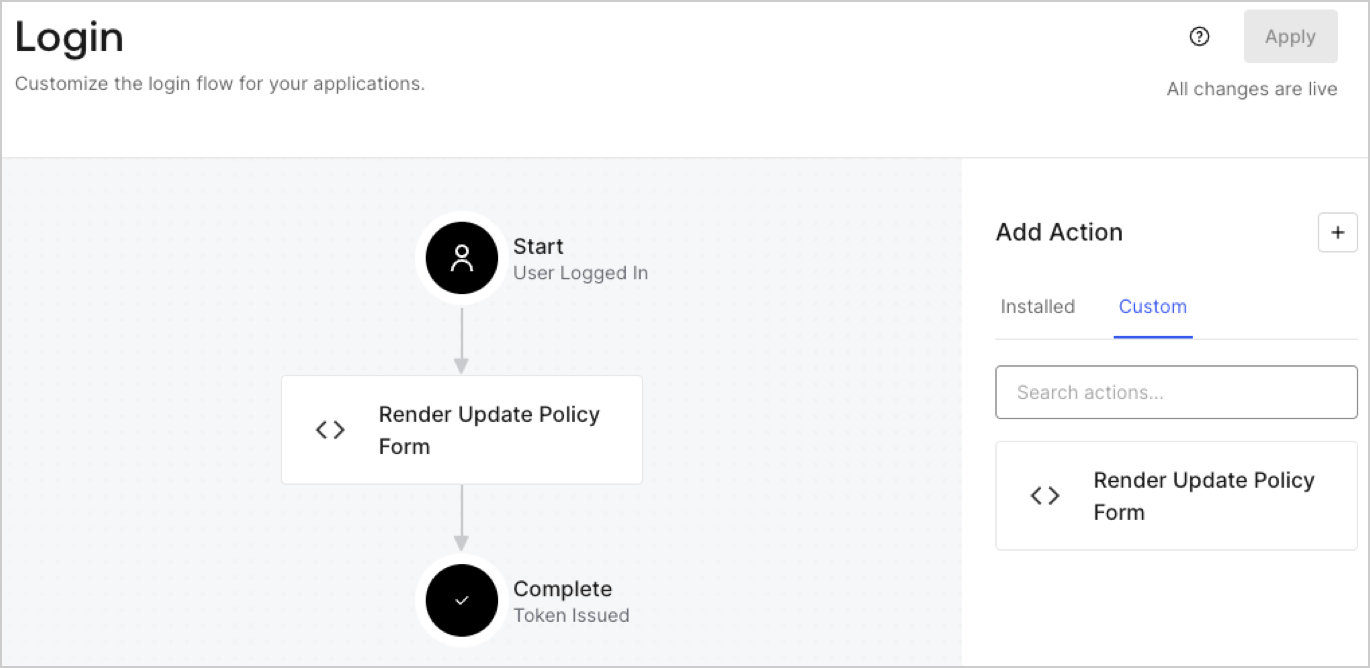
Create a post-login Action to render your form by following these steps:

1. Navigate to **Auth0 Dashboard > Actions > Flows > Login.**
2. Select the **+** icon and Select **Build from scratch**:

   * **Name**: Enter `Render Update Policy Form`.
   * **Trigger**: Select `Login / Post Login`.
   * **Runtime**: Select the recommended version.
3. Select **Create**.

To configure the post-login Action:

1. Delete the existing code from the Code editor.
2. Paste the form render code into the Code editor.
3. Edit the code to define the conditional logic that will render the form.

   ```javascript lines theme={null}
   /**
   * @param {Event} event - Details about the user and the context in which they are logging in.
   * @param {PostLoginAPI} api - Interface whose methods can be used to change the behavior of the login.
   */
   exports.onExecutePostLogin = async (event, api) => {
     const FORM_ID = 'REPLACE_WITH_YOUR_FORM_ID';

     if (event.user.app_metadata.privacy_policies !== true) {
       api.prompt.render(FORM_ID);
     }
   }

   exports.onContinuePostLogin = async (event, api) => { }
   ```

   <Callout icon="file-lines" color="#0EA5E9" iconType="regular">
     The example code above will render the form when a user is missing the app metadata `privacy_policies` property.
   </Callout>
4. Select **Deploy.**
5. Drag and Drop the **Render Update Policy Form** Action to the **Login** flow.
   <Frame>
     <img src="https://mintcdn.com/docs-dev-feat-docs-5417-afc/fdtZsCV3Y7F1Q8bk/docs/images/cdy7uua7fh8z/5TOwDgevZsBqd7yZynUYWU/41ca909dc3007aed4f40ff794a05efa5/postlogin.png?fit=max&auto=format&n=fdtZsCV3Y7F1Q8bk&q=85&s=cd1160fccbe548ed19b613bca6000387" alt="Dashboard > Forms > Use Case > Render update policy form login action" data-og-width="1370" width="1370" data-og-height="668" height="668" data-path="docs/images/cdy7uua7fh8z/5TOwDgevZsBqd7yZynUYWU/41ca909dc3007aed4f40ff794a05efa5/postlogin.png" data-optimize="true" data-opv="3" srcset="https://mintcdn.com/docs-dev-feat-docs-5417-afc/fdtZsCV3Y7F1Q8bk/docs/images/cdy7uua7fh8z/5TOwDgevZsBqd7yZynUYWU/41ca909dc3007aed4f40ff794a05efa5/postlogin.png?w=280&fit=max&auto=format&n=fdtZsCV3Y7F1Q8bk&q=85&s=a99d8fd1e4f969bbefb88e2e9fba2abc 280w, https://mintcdn.com/docs-dev-feat-docs-5417-afc/fdtZsCV3Y7F1Q8bk/docs/images/cdy7uua7fh8z/5TOwDgevZsBqd7yZynUYWU/41ca909dc3007aed4f40ff794a05efa5/postlogin.png?w=560&fit=max&auto=format&n=fdtZsCV3Y7F1Q8bk&q=85&s=359229bae018ace5a7f2ee43d56f3079 560w, https://mintcdn.com/docs-dev-feat-docs-5417-afc/fdtZsCV3Y7F1Q8bk/docs/images/cdy7uua7fh8z/5TOwDgevZsBqd7yZynUYWU/41ca909dc3007aed4f40ff794a05efa5/postlogin.png?w=840&fit=max&auto=format&n=fdtZsCV3Y7F1Q8bk&q=85&s=9a389b70f5f90e47a7cc2579d6c5173d 840w, https://mintcdn.com/docs-dev-feat-docs-5417-afc/fdtZsCV3Y7F1Q8bk/docs/images/cdy7uua7fh8z/5TOwDgevZsBqd7yZynUYWU/41ca909dc3007aed4f40ff794a05efa5/postlogin.png?w=1100&fit=max&auto=format&n=fdtZsCV3Y7F1Q8bk&q=85&s=441b932faf2ca6993e8e958537a0eeba 1100w, https://mintcdn.com/docs-dev-feat-docs-5417-afc/fdtZsCV3Y7F1Q8bk/docs/images/cdy7uua7fh8z/5TOwDgevZsBqd7yZynUYWU/41ca909dc3007aed4f40ff794a05efa5/postlogin.png?w=1650&fit=max&auto=format&n=fdtZsCV3Y7F1Q8bk&q=85&s=acf6e8d700e15deaa921bf671cf89de5 1650w, https://mintcdn.com/docs-dev-feat-docs-5417-afc/fdtZsCV3Y7F1Q8bk/docs/images/cdy7uua7fh8z/5TOwDgevZsBqd7yZynUYWU/41ca909dc3007aed4f40ff794a05efa5/postlogin.png?w=2500&fit=max&auto=format&n=fdtZsCV3Y7F1Q8bk&q=85&s=2cc77a7be5f7cd0810f308c9bb5382ec 2500w" />
   </Frame>
6. Select **Apply.**

### Test implementation

Test the implementation by following these steps:

1. Log in with an existing user whose app`_metadata` attribute `privacy_policies` does not have a value.
2. The post-login Action in the Login flow will render the form and prompt for acceptance.
3. Select **Auth0 Dashboard > User Management > Users,** locate the user and verify that the `app_metadata` attribute `privacy_policies` contains a `true` value and a timestamp.
